1. Function Syntax
hLookUp(v, array, n, [type])
hLookUp(v, array, n, [type], [startIndex], [occurrence])
The hLookUp() function searches the top row of array for the value v. If a match is found, the function returns the value from the same column and the n‑th row of the array.
2. Extended Variant: startIndex and occurrence
The extended variant adds two parameters:
startIndex — Positive values specify where searching begins (1 = top‑left cell, 2 = next cell, etc.). Negative values specify where searching ends (−1 = bottom‑right cell, −2 = preceding cell, etc.).
occurrence — Specifies which occurrence of the matching value to return. Positive values count matches top‑down (1 = first match, 2 = second match, etc.). Negative values count matches bottom‑up (−1 = last match, −2 = second‑to‑last, etc.). Occurrences are counted relative to startIndex.
3. Search Type
The type argument determines how the search is performed. It may be one of the basic modes (0, 1, −1) or a sum of SEARCH:: flags.
3.1 Basic Search Modes
-
0 — Exact match (linear search)
Performs a linear search for an exact match. The search value v may contain wildcard patterns:- ? — matches any single character
- * — matches any sequence of characters (including empty)
- ~? — literal question mark
- ~* — literal asterisk
-
1 — Largest value ≤ v (ascending)
If no exact match is found, returns the largest value that is not greater than v. No wildcard matching is performed. The searched range must be sorted in ascending order. -
−1 — Smallest value ≥ v (descending)
If no exact match is found, returns the smallest value that is not smaller than v. No wildcard matching is performed. The searched range must be sorted in descending order.
3.2 SEARCH:: Flags
Instead of using 0, 1, or −1, you may specify a sum of SEARCH:: flags:
- SEARCH::MatchNotGreater (2) — largest value ≤ v
- SEARCH::MatchNotSmaller (4) — smallest value ≥ v
- SEARCH::SortAscending (8) — binary search, ascending order
- SEARCH::SortDescending (16) — binary search, descending order
- SEARCH::CaseSensitive (128) — case‑sensitive comparison
- SEARCH::FirstMatch (256) — return first match
- SEARCH::LastMatch (512) — return last match
- SEARCH::MixedData (2048) — range contains both text and numbers
- SEARCH::RegEx (8192) — v is a regular expression
- SEARCH::IgnorePunctuation (16384) — ignore certain punctuation marks
- SEARCH::NeutralSortOrder (32768) — language‑neutral comparison
- SEARCH::Pattern (65536) — v is a wildcard pattern (? and *)
3.3 Pattern Matching vs. Regular Expressions
-
SEARCH::Pattern
Uses wildcard matching with ? and *. Cannot be combined with fast binary searching (SortAscending / SortDescending). -
SEARCH::RegEx
Uses regular expressions. Cannot be combined with:- SEARCH::MatchNotGreater
- SEARCH::MatchNotSmaller
- SEARCH::StringSort
- SEARCH::CaseSensitive
- SEARCH::SortAscending
- SEARCH::SortDescending
3.4 Type Equivalents
1 = SEARCH::SortAscending + SEARCH::MatchNotGreater
−1 = SEARCH::SortDescending + SEARCH::MatchNotSmaller
0 = (0)
If type is omitted, it defaults to 1.
4. Flag Compatibility Rules
SEARCH::Pattern and SEARCH::RegEx cannot be used with:
- SEARCH::MatchNotGreater
- SEARCH::MatchNotSmaller
- SEARCH::StringSort
- SEARCH::CaseSensitive
- SEARCH::SortAscending
- SEARCH::SortDescending
SEARCH::MatchNotGreater and SEARCH::MatchNotSmaller cannot be used with SEARCH::FirstMatch or SEARCH::LastMatch.
If neither SEARCH::FirstMatch nor SEARCH::LastMatch is specified, linear search returns the first match, while binary search may return any match.
5. Sorting Requirements
If SEARCH::SortAscending or SEARCH::SortDescending is used:
- The searched range must be sorted accordingly.
- The range should not contain formulas that break the sort order during recalculation.
- No circular reference warnings will be reported for cells other than the result cell.
Binary searches are typically tens or hundreds of times faster than linear searches.
6. Mixed Data
If SEARCH::MixedData is specified:
- The range may contain both numbers and text.
- If v is text, all values are converted to text before comparison.
- If v is numeric, text values representing numbers are converted to numbers.
- If sorting flags are used, the range must be sorted using mixed numeric/text ordering.
7. Performance Tip
If a workbook contains many hLookUp() calls, you may use the numeric sum of flags instead of individual names for faster evaluation.
8. Error Handling
If no match is found, hLookUp() returns #N/A!.
9. Examples
=hLookUp(2, {1, 2, 3; "a", "b", "c"}, 2, 0)
returns "b"
=hLookUp(2.5, {1, 2, 3; "a", "b", "c"}, 2, -1)
returns "c"
=hLookUp(2.5, {1, 2, 3; "a", "b", "c"}, 2, 1)
returns "b"
=hLookUp("*bc??", {"abc", "abcde", "ac"; 1, 2, 3}, 2, 0)
returns 2
=hLookUp(2.5, sheet1!b5:d10000, 2, SEARCH::SortAscending + SEARCH::MatchNotGreater)
=hLookUp("bc\d", {"abc", "abcde", "abc10"; 1, 2, 3}, 2, SEARCH::RegEx,,)
returns 3
10. Insert hLookUp() Automatically
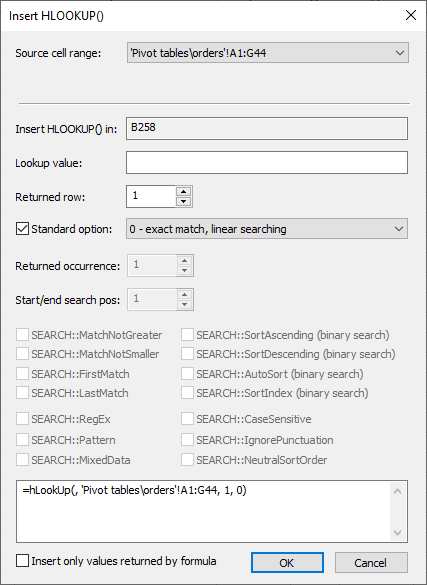
You can insert hLookUp() with two clicks using Insert → HLOOKUP(). The dialog box determines optimal parameters, presets options, and builds the formula automatically.
11. Source Range List
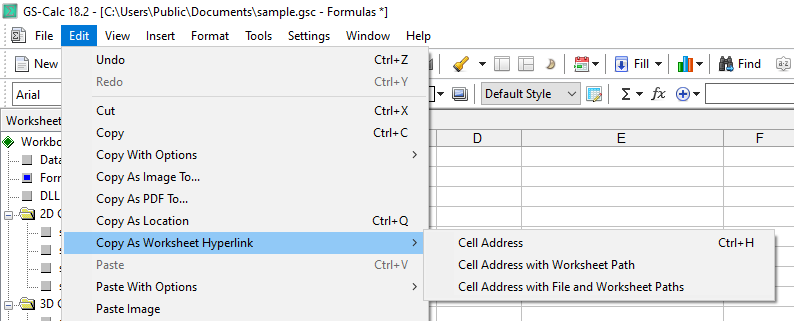
The 16‑element source range list is global and stored in the settings file. New ranges are added in a circular manner using:
“Copy as Location”
The “Enter” toolbar button