1. Overview
You can create multiple selections to automatically calculate function values (means, sums, quartiles, etc.) for selected cells.
2. Using the Mouse
-
Add cells or ranges: Hold Ctrl and click a cell or select a range.
The table toolbar displays the label combined cells before the function values, and the combined references appear in the composer toolbar’s edit field.
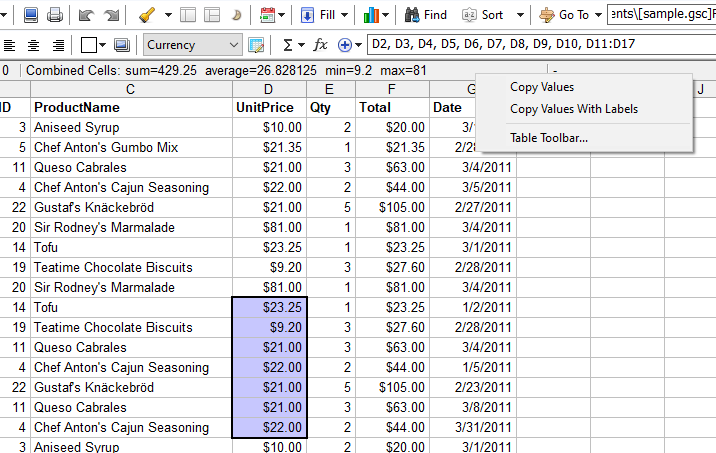
To reset the combined list, click anywhere on the sheet without holding Ctrl, or press/release Shift.
3. Using the Keyboard
-
Press Ctrl + Numpad0 to add the current selection to the combined list.
Adding the same selection twice exits the selection mode and clears all selections.
4. Copying Calculated Values
To copy the calculated values, right‑click the table toolbar. Values can be copied as a single column:
    407.25
    27.15
    9.2
    81
or with labels:
    sum        407.25
    average    27.15
    min        9.2
    max        81
5. Selecting Functions
To choose which functions are calculated, click the table toolbar to display its options:
