1. Overview
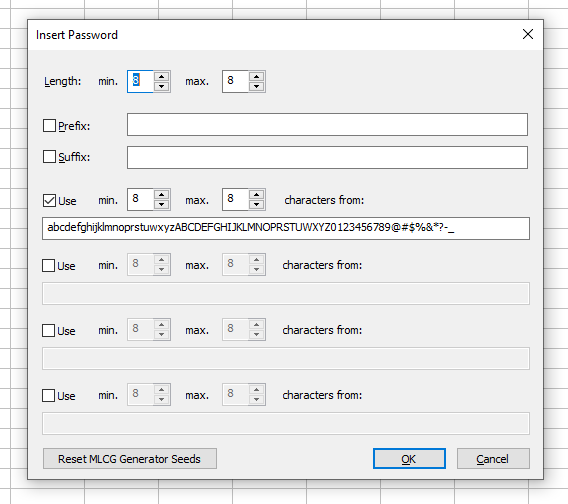
The Insert > Password command allows you to fill selected cells with unique passwords.
Increasing the password length or expanding the character set increases the probability of uniqueness.
For example, with default settings, generating 8‑character passwords for an entire 12‑million‑row column should produce all unique values.
Passwords are generated using a continuously advancing partial MLCG random series (~1018/4 passwords). Clicking Reset MLCG Generator Seeds starts a new independent series.
2. Checking for Duplicates
You can verify uniqueness using:
- F3 / Find > Find All > Find Duplicates
- FILTER() with the “duplicates” filter
Note: Some duplicates may differ only by letter case (lowercase vs uppercase). The Find Duplicates command lists them side by side.
3. Unicode Considerations
Generated passwords may include Unicode characters. However, non‑ASCII characters should be used cautiously because some systems — especially recovery systems — may not support them.
4. Using Passwords for Random Data Testing
Unique text strings can also be used to test data models with random data.
To generate random lists of predefined strings:
- Use Insert > Custom Series to load or create a list.
- Use Insert > Random Data with that list name.